

Category Archives for Taxes
How To Calculate and Pay Your Estimated Taxes
 The following post is by MPFJ staff writer, Grayson Bell. Grayson, who runs the finance blog Debt Roundup, is a fan of personal finance, brewing beer, and working on cars.
This year I got a surprise when I finished up my taxes.
I owe quite a bit to the federal government. Why do I owe money? The answer for my situation is simple. I earned income on the side.
Anytime you earn income on the side of your regular job, you are required to pay taxes on it. The government wants their cut of everything that you make, so even if you get paid in cash, you are still supposed to report it. While I knew that I was going to make extra money last year, I didn’t realize how much. I could have avoided having to pay this year (plus any potential penalties) if I would have just properly estimated my taxes.
What Are Estimated Taxes?
Estimated taxes are payments that you make to the government to cover your tax liability on income not subject to withholding. A common form of this income would be earned through self-employment. Even though I am employed full-time, any extra income that I make on the side from freelancing and running a small business is considered self-employment income. Other applicable income includes interest, dividends, alimony, proceeds for the sale of assets, rent, and prizes/awards.
Anyone who believes they will owe more than $1,000 when taxes are due should be prepared to pay estimated taxes. If you had a tax liability for the previous year, then you might have to pay estimated taxes.
How to Calculate Estimated Taxes
It can be difficult to calculate how much you will need to pay for estimated taxes, but the IRS does have a calculation worksheet. They include it on their 1040-ES form. This form provides great detail into when you will have to pay and also helps you calculate how much you will owe. There are a few ways to calculate your estimated tax liability.
100% of previous year – If you owed more than $1,000 when you filed your return, then the safest way to deal with estimated taxes is to go with 100% of your previous years taxes. This would be to simply take what you owe to the federal government on your previous return and that would be what you need to pay. If your previous year’s adjusted gross income was more than $150,000, then you will need to go with 110%.
100% of current year – This number can be hard to know. You can use the IRS worksheet or software like TurboTax to help you calculate this number. If you are going to make the same salary, but can estimate how much you will make on the side this year, then this method can work. You use this calculation to ensure you don’t owe again on the next return. You do have the ability to change your calculation during the year, especially if your income fluctuates.
Avoiding a Penalty
If you don’t estimate your taxes properly, then you could owe a penalty. I had to pay one this year because I didn’t meet the criteria to have the penalty waived. This is an underpayment penalty. The penalty is currently an annual 4% of the amount you underpaid each period. This penalty can be avoided if your tax payments for the year exceed the lower of these two withholding scenarios:
- 90% of the current tax year minus credits
- 100% of the previous years tax (ie. You pay 100% of what you did in your last tax return or 110% if you make over $150,000)
You could also owe a penalty if you don’t pay your estimated taxes on time. If you are past their specified due dates, then you could be eligible for a penalty.
How to Pay Estimated Taxes
If you have your estimated taxes calculated, then it is important to understand how to pay them. The 1040-ES form comes with four payment vouchers. This allows you to split up your estimated tax liability into four payments. These can be equal or you can change the amounts depending on your calculated income. The IRS has strict payment deadlines. Here are the due dates for this current year.
1st Payment – Due on April 15th
2nd Payment – Due on June 16th
3rd Payment – Due on September 15th
4th Payment – Due on January 15th of the next year
If you want more in depth information about due dates and how you deal with them, then read more from the IRS estimated taxes section.
The IRS provides you with three ways to pay your estimated taxes. They are:
- Online – You can pay your estimated taxes online with a bank draft (e-check) or using a credit/debit card. The IRS has a site called the Electronic Federal Tax Payment System (EFTPS), which allows you to make your tax payments. Please note that will are charged a fee to use your credit and debit card. It is free to use the bank transfer option.
- Over the Phone – If you need to make your tax payment and you can’t get online, then you can call the EFTPS customer service line. If you want to pay by a bank transfer, then call 1-800-555-4477. If you want to pay with a credit or debit card, then you have to call one of the IRS’s payment providers. They are listed here.
- With Check and Voucher – This is going to be your slowest method. The four vouchers on the 1040-ES form will be used and you will need to mail your payment in to the nearest IRS office. There is a section on the 1040-ES form that tells you which office you need to mail your check to. The IRS does consider the postmarked date as when it was paid, not the date they receive it.
If you don’t want to deal with paying the tax on your own, then you can have your employer withhold more on your regular paychecks. This only works if you are receiving paychecks. You would need to resubmit an adjusted W-4 to your employer requesting that they withhold more than they normally do. You will still need to make sure they are withholding enough so you don’t owe when you complete your return.
Do it Yourself or Hire an Accountant?
The debate continues on whether you should deal with taxes yourself or hire an accountant.
I have used TurboTax for years and it makes my taxes easy. It even helped me calculate the estimated tax payments for this year. That being said, I believe next year will be time to hire an accountant. We are selling our home and buying another, along with me cashing in some stock options, and making more side income. This year’s taxes are going to be complicated and I want to make sure it is done right.
(A side note from Jacob: I was quite surprised how affordable an accountant can be. Some of the premium plans for online tax prep platforms can charge you around $90, whereas, some accountants cost less than $300 to prepare your taxes.)
If you don’t feel comfortable calculating your estimated taxes, then seek professional help. There is no need to get it wrong and have to pay a penalty just because you didn’t understand the calculations. If you are tax savvy and you can use the TurboTax or H&R Block software, then feel free. It will cost less than a tax accountant and give you a little more insight into how estimated taxes are done. Either way, feel comfortable with the option you choose and make sure you properly calculate and pay your estimated taxes.
How about you all? Do you have to pay estimated taxes for your income that is not taxed when it is paid? How do you pay your estimated taxes – online, via check, or on the phone?
Do you use an accountant to file your taxes?
Share your experiences by commenting below!
***Photo courtesy of http://www.flickr.com/photos/moneyblognewz/5610981299/sizes/l
A Review of My 2013 Income Tax Results and 2014 Tax Planning

 This past week, I received my completed 2013 federal and state income tax return documents from the accountant. After making one correction due to some confusion on whether my Solo 401k contributions were deductible or not, my taxes were successfully e-filed a few days later.
In general, the results were very good, as I felt like I leveraged the tax code to the best of my ability in order to maximize wealth. As has become my habit over the past few years, I feel that by analyzing some of the finer details/numbers, I can better plan for how to approach my tax planning for the 2014 year.
Specifically, the questions I am interesting in answering are as follows:
- How much of my un-taxed income should I be saving each month in order to pay taxes when the time comes?
- What would I predict my marginal tax bracket will be in 2014?
Let’s get started!
2013 Income Breakdown
My 2013 gross income can be broken down in to the following components:
- 3% from dividends, capital gains, and interest from investments (meaning that I can likely ignore this contribution for planning purposes since it is so small).
- 71% from untaxed fellowship/wage income for my work as a graduate student.
- 26% from Schedule C self-employed business income.
2013 Deductions
Since the standard deduction was greater than my itemized deductions, I took the standard deduction of $6,100 for 2013.
After subtracting the 1 personal exemption I get for myself (with no kids, filing as a single person), I arrived at a taxable income that was only 77% of my original gross income that I started with.
2013 Federal Taxes
Having established my taxable income, my total personal federal taxes were computed. Next, self-employment taxes were added on top of the personal taxes.
This resulted in my total Federal taxes owed for 2013 being ~14% of my overall gross income.Nice! I am surprised this percentage is so low!
If we calculate this based on my AGI or taxable income, the percentages become 14% and 18%, respectively.
2013 State Taxes
For my Virginia State Income Taxes, the form starts out with my federal AGI mentioned above. From there, the VA standard deduction and my personal exemption reduces my taxable income to 90% of my overall gross income.
Having obtained my VA taxable income, my 2013 total state taxes owed was calculated to be 5% of my overall gross income. If we calculate this based on my federal AGI or federal taxable income, the percentages become 5% and 6%, respectively.
2013 Total (State + Federal) Taxes
If we put everything together from both state and federal taxes, we can find something useful for planning purposes going forward:
- I paid a total tax amount for 2013 equal to 19% of my overall gross income.
- My marginal tax bracket was 15%.
2014 Estimated Tax Payment Schedule
One of the nice things that my accountant does do for me each year is to calculate/prepare my estimated taxes for the following tax year (so 2014 was prepared during the 2013 tax preparation round).
For both the Virginia and federal estimated taxes for 2013, the accountant scheduled my payments to be approximately equal to the total tax I owed for the 2013 (only differ by some small rounding amounts used).
Target Question # 1 – How much of my un-taxed income should I be saving each month in order to pay taxes when the time comes?
For 2014 tax planning purposes, the important question I have at this point is what percentage of my un-taxed fellowship and un-taxed self-employment income should I be saving to pay the tax man this next year?
On one hand, I do have the requirement that I need to pay the scheduled estimated taxes set forth by the accountant, primarily based on my 2013 tax amounts. This part I really can’t change.
On the other hand, I am guessing that my overall UN-TAXED income will be lower in 2014 compared to 2013. While I predict that my un-taxed self-employment income will be roughly the same, my un-taxed fellowship income in 2014 will be 2/3 what it was in 2013 since I will be finishing my PhD by August. After which time, if I can hopefully find a job, I will transition in to being paid as an employee, where taxes are taken out of my paycheck ahead of time. What this means is that by paying my estimated taxes per the scheduled amounts set by my 2013 taxes, I will likely be overpaying them this year. Of course, when I do start working as an employee, I could definitely crank up my exemptions so that my employer withholds less taxes each paycheck.
So, where does this all leave me?
Overall, I think the best course of action is to continue saving money to pay taxes based on the un-taxed gross income I realize/track on a month-to-month basis. The amount that I will save for taxes will continue to be 20%, based on my 2013 total tax owed being ~19-20% of my gross income. This will help me most accurately match my real taxes that I will owe overall for the year.
Target Question # 2 – What would I predict my marginal tax bracket will be in 2014?
Another very important and related topic is trying to make a prediction for how my tax bracket will change, if at all, assuming that I can successfully obtain employment in the last 3rd of this year.
If I utilize my 2013 tax return gross income amounts as a starting point, only add up my fellowship income for 2/3 of the year, and add in an approximate amount I will make in my new job the last 3 months of the year (assuming starting in October 2014), there is really no chance for me to make it in to the 15% tax bracket if I assume I will file individually.
However, since I’m getting married later this year, I will be able to file my 2014 tax return jointly with my fiance. Adding her income for 2013 on top of mine and then subtracting out the generous filing jointly standard deduction and 2 personal exemptions (1 for each of us), I predict that we will have no trouble getting in to the 15% marginal tax bracket for 2014.
This is good news, as it means 1) full steam ahead contributing to my Individual Roth 401k, and 2) saving 20% of my un-taxed income is still an appropriate amount to be saving.
If you’re interested in seeing the 2014 tax brackets, standard deductions, and personal exemption levels, I would recommend taking a look at the following article on Forbes.com.
How about you all? What lessons did you learn from your 2013 taxes that you will carry forward in the next year?
Have you ever calculated what % of your gross income you pay in state + federal taxes?
Share your experiences by commenting below!
***Photo courtesy of http://www.flickr.com/photos/judgmentalist/9351909/sizes/o/in/
How Can Tax Lien Sales Increase Your ROI?

 This is a post by MPFJ staff writer, Jeff. Jeff writes about Sustainable living and finances at his website, Sustainable Life Blog. Jeff really enjoys traveling with his wife as much as he can, to wherever he can.
There are a lot of investment options out there: stocks, bonds, p2p lending, and more.
Some people advocate a simple portfolio with a mix of socks and bonds that changes depending on your age, and others suggest keeping it ultra simple and investing in just 1 broad index fund.
Those are some of the more popular options, but they are not the only things out there that will help you get a decent return on your money. I’ve been looking into different ways to get a better return on investment (ROI) with low risk for the past few years and I think I’ve finally found a favorite: tax liens.
What is a tax lien?
Every year, property owners have to pay a tax on the property they own, at a rate set by the government. The rate varies by the use of the land (for instance farm land is taxed at a lower rate than land with an office building on it). As we know, the taxes are used for things like schools and roads. Most people who are still paying a mortgage do not need to worry about this tax, as it is paid out of the escrow account that a portion of their mortgage payment goes to every month. If you own your home outright though, you’re on the hook for paying your property tax.
When people forget to pay their property tax or they can’t afford it and don’t pay it, the government puts a lien on the property. This lien becomes first debt paid in the event of a sale of the property (if one were to occur).
How can this help my returns?
You’re probably thinking this is great but how does it help me? Well, the government needs money to do the things it wants to do over the course of a year, like inspect buildings and fix roads. They expect a certain amount of money from property taxes each year to do those things and when some people don’t pay, they won’t have enough money to do what they need to do for the next 12 months.
The government solves this shortfall by selling the tax liens to investors. The government also promises a certain rate of return to the investors for their troubles. Where I live (Wyoming) the rate is 15%, and in Colorado the rate is prime plus 9%. By doing this, the government gets their money to operate for the fiscal year, and the investors get a very healthy ROI.
How can I find tax lien sales?
Usually, each county will have their own sale of tax liens. For Wyoming they are usually in August or September. I’ve looked at some larger areas that will have the lien sales once a month. The easiest way to find out about when yours is would be to Google “your county tax lien sale”, or you can call the county assessor or county treasurer’s office.
The best part about these is that you don’t have to only buy them in your county! You can go to any counties sale and try to purchase them if you want to. I’ve been to sales in 3 different counties.
What are the downsides?
There are not many downsides to this. As my dad always says ” the wheels of the government turn slow but they grind just fine”. What he means by this is that the government always gets their money. What this means though is that you (as the investor) have downside protection.
In Wyoming, if you purchase a tax lien at a sale, they will notify you if the taxes are not paid the next year and give you the option to pay those as well. If you pay for 4 consecutive years, then you can begin legal proceedings to take ownership of the property. I have not gotten to this point yet, but I understand that it also takes time.
Bottom line for tax lien sales:
Where I live, you can get 15% interest for the years that you pay the lien if the property owner pays you back. If you pay for 4 consecutive years and are not paid back, you can begin proceedings to take control of the property.
I guess the ultimate downside is that you get stuck with a piece of property you don’t want, but in my mind that’s a small downside.
So, how about you all? Have you ever invested in a tax lien sale before? If so, how did you like it?
Share your experiences by commenting below!
***Photo courtesy of http://www.flickr.com/photos/666_is_money/6036913933/sizes/l/
A Review of My 2012 Income Tax Results and 2013 Tax Planning

————————————————————————————————————————
Welcome to My Personal Finance Journey! If you are new here, please read the “About” or “First-Time Visitor” pages to find out more about us. If you would like to receive free updates on articles like this by email, then sign up here or you can subscribe to the RSS feed. Also, check us out on Twitter or Facebook. Thanks for visiting! Keep on learning!
————————————————————————————————————————
This past week, I finally received my completed 2012 federal and state income tax return documents from the accountant.
In general, the results were very good. However, I feel that by analyzing some of the finer details/numbers, I can better plan for how to approach my tax planning for the 2013 year.
Specifically, the questions I am interesting in answering are as follows:
- How much of my un-taxed income should I be saving each month in order to pay taxes when the time comes?
- Should I use an accountant for filing my 2013 taxes next year?
Let’s get started!
2012 Income Breakdown
- 2.3% from dividends and interest from investments (meaning that I can likely ignore this contribution for planning purposes since it is so small).
- 68% from untaxed fellowship income for my work as a graduate student.
- 29.7% from Schedule C self-employed business income.
After subtracting out the deductible part of self-employment taxes and my contributions to my Individual/Self-Employed 401k account, I arrived at an Adjusted Gross Income (AGI) that was 20% lower than my overall gross income, so that was nice!
2012 Deductions
2012 Federal Taxes
2012 State Taxes
2012 Total (State + Federal) Taxes
- I paid a total tax amount for 2012 equal to 14.6% of my overall gross income.
- For 2011, I calculated this number to be 17.8%.
2013 Estimated Tax Payment Schedule
Target Question # 1 – How much of my un-taxed income should I be saving each month in order to pay taxes when the time comes?
- To be conservative, I will save 20% (so slightly higher than the 15% and 18% taxes I paid in 2012 and 2011, respectively but lower than the 33% I was saving for last year) of my un-taxed gross income each month in order to pay taxes/estimated taxes for 2013.
Target Question # 2 – Should I use an accountant for filing my 2013 taxes next year?
This got me thinking – does an accountant provide me with enough value to keep using the same one (or different) going forward?
Well, let’s start by first addressing the easy question of using the same accountant going forward. For the past few years, I have been using an accountant 1300 miles away back home in Arkansas because they were tying the payment for my taxes in with my Dad’s business tax return (essentially doing my tax return without much additional compensation). Since my Dad is no longer having business taxes done since he has switched to regular employee income, I have to now pay to use that accountant. Obviously, there is no reason for me to stay with that same accountant since they are 1) charging me and 2) so far away.
So, the question now becomes – do I find a local accountant here in Virginia or just do my taxes myself using Tax Act?
Since I have self-employed income/a home business, my taxes tend to be rather complicated. In addition to standard estimated taxes that I pay periodically, I seem to often have tax-related questions that come up throughout the year as I am reading about various issues related to personal finances. In my mind, it is rather valuable to have a certified tax professional that I can openly ask about these issues. In addition, using an accountant to do my taxes provides me with a certain amount of peace of mind that is hard to put an exact price on. However, the number is definitely higher than the cost of the $151 from the 2012 tax return.
Because of the two considerations discussed in the paragraph above, I will likely start seeking out a local accountant here in Virginia to help with my 2013 taxes based on recommendations of several people I know here in the community. I’ll be sure to share my experiences of screening CPA’s as I go through the process, but I will need to do this sooner rather than later since I will likely need to mail 1099-MISC’s to my staff writers from this site prior to January 31st, 2014 so that they can file their 2013 tax returns on time and I can avoid penalties.
How about you all? What lessons did you learn from your 2012 taxes that you will carry forward in the next year?
Have you ever calculated what % of your gross income you pay in state + federal taxes (this is the first time I have ever calculated a percentage)?
Share your experiences by commenting below!
***Photo courtesy of http://farm4.staticflickr.com/3067/2592570286_b213acd1de_z.jpg?zz=1
TurboTax, H&R Block, Tax Act, or a Certified Public Accountant – Who Can Do Your Taxes Better?

————————————————————————————————————————
Welcome to My Personal Finance Journey! If you are new here, please read the “About” or “First-Time Visitor” pages to find out more about us. If you would like to receive free updates on articles like this by email, then sign up here or you can subscribe to the RSS feed. Also, check us out on Twitter or Facebook. Thanks for visiting! Keep on learning!
————————————————————————————————————————
Well folks, the results are finally in – I have done the unthinkable by completing my 2012 personal/business tax return 4 times!
Ohhhh the horror, right?!!?
Why on Earth Would I Do My Taxes 4 Times?
I think we could agree that for most people, doing one’s taxes would not exactly be considered “fun,” and definitely not something that you would want to subject yourself to 4 times over in one year!
However, my purposes for going through my taxes 4 times were two-fold:
- To compile/utilize what I had learned in the 4 posts I wrote in the past month, first taking an in-depth look at the TurboTax, H&R Block, and Tax Act online tax preparation platforms and then comparing and contrasting all of their features at once to conclude which is best.
- To compare the performance of these online tax preparation platforms to having a tax professional (CPA) help me in an effort to determine if the extra cost of the tax professional is warranted by the bottom line figures of my tax return.
My 2012 Tax Return Results Using TurboTax
Nevertheless, I was able to get through their online system pretty well when I calculated my 2012 tax return in TurboTax. Below is a summary of my experience:
- Since I had business/self-employed income in 2012, I had to upgrade to the $75 Home & Business version of their software.
- I was prompted to enter my relevant expenses for a home office deduction.
- They also prompted me to take a depreciation expense for my home office as well.
- It was very hard to tell where I should enter my contributions to my pre-tax Self Employed 401k retirement account (results in tax deduction for current tax year).
- After entering all of my numbers, it resulted in the following return amounts:
- $150 Federal Income Tax Refund.
- Owed $352 in additional state taxes to the state of Virginia.
My 2012 Tax Return Results Using H&R Block
In my overall comparison of the popular online tax prep platforms, H&R Block was a very respectable option that featured middle-of-the-road pricing. In my opinion, it was the most straight-forward, easiest to use, and least confusing platform.
Below is a summary of my experience when I entered my 2012 tax return numbers in to H&R Block:
- As was the case with TurboTax, since I had business/self-employed income in 2012, I had to upgrade to the $50 Premium (most expensive) version of their software.
- For some reason that I could never figure out, the H&R Block system said that I could only contribute $4195 to my Roth IRA for 2012 (lower than the maximum contribution of $5000).
- I’m not sure why it stated this since I had made at least $5000 in income in 2012 and was below the maximum Roth IRA income limits.
- After entering all of my numbers, it resulted in the following return amount:
- $802 Federal Income Tax Refund.
- It did not calculate my expected state income tax return/owed numbers.
My 2012 Tax Return Results Using Tax Act

You can get their Deluxe edition along with one state tax filing for only $19!! Pretty awesome in my book for doing your yearly taxes!
Below is a summary of my experience when I entered my 2012 tax return numbers in to Tax Act:
- As was the case with the other two online platforms, since I had business/self-employed income in 2012, I had to upgrade to the Deluxe version of their software. However, it is only $19 and includes a state tax filing, so it’s hardly anything in the grand scheme of things!
- I was prompted to enter my relevant expenses for a home office deduction.
- They also prompted me to take a depreciation expense for my home office as well.
- As was the case with H&R Block, for some reason that I could never figure out, the Tax Act system said that I could only contribute a certain amount (I forgot to write down the exact number) to my Roth IRA for 2012 (lower than the maximum contribution of $5000).
- I’m not sure why it stated this since I had made at least $5000 in income in 2012 and was below the maximum Roth IRA income limits.
- After entering all of my numbers, it resulted in the following return amounts:
- $972 Federal Income Tax Refund.
- Owed $35 in additional state taxes to the state of Virginia.
My 2012 Tax Return Results Using a Certified Public Accountant
However, since my Dad is now being paid as a regular employee, I no longer have this free service, and had to pay $200 for the accountant to do my taxes this year. Not too bad at all, but not free! Whether or not I will continue to utilize an accountant for my 2013 taxes will be the subject of a separate post all-together (on the way soon!).
Below is a brief summary of my experience of doing my taxes with the help of the CPA (I’ll describe in more detail in a future post):
- I was prompted to enter my relevant expenses for a home office deduction.
- They did not prompt me to take a depreciation expense for my home office as well.
- After receiving my return from the accountant after 1 month of waiting and a $200 fee, it resulted in the following return amounts:
- $990 Federal Income Tax Refund.
- Owed $23 in additional state taxes to the state of Virginia.
Conclusions
In reviewing all of the numbers above, we can make the following conclusions:
- Assuming of course that I used the platform correctly (hopefully I did!), using TurboTax would have been an extremely costly mistake.
- It would have resulted in a loss of $1139 vs. using Tax Act. Crazy!
- As is the case with their platform pricing, H&R Block again represents the “middle-of-the-road” return amount with a federal income tax refund of $802. Not too bad!
- As I mentioned above, Tax Act, along with offering the lowest fees, resulted in me getting the most money back from the IRS / owing the least amount of money to the State of Virginia of all three online tax prep options.
- Looking solely at the federal return and state taxes owed numbers, I got a $30 net gain/improvement in using a CPA over the best online tax preparation option, Tax Act.
- However, this does not take in to consideration the $200 fee I had to pay the CPA and $19 fee to use Tax Act.
- If the fees of using Tax Act vs. a CPA are considered, the $30 improvement shown above turns in to a loss of $151 by using a CPA over Tax Act.
So, purely from a bottom-line numbers perspective, Tax Act delivers the highest value.
However, there are some other non-numerical considerations that makes the Tax Act vs. CPA usage more complicated (and hence will be the subject of the future post described above). For example, you get a nice level of assurance when you use a CPA that your taxes are done correctly. They also reduce the amount of work you have to do, along with me as a business owner, being able to bounce questions off of them throughout the year. In addition, they calculated and prepared my 2013 estimated tax payment stubs and numbers as well, so that is a nice service!
How about you all? How did you file your taxes this past year – an online tax prep platform, through an accountant, or filing out the forms directly?
In general, do you feel the guidance provided by an accountant is worth the fees required for their services?
Share your experiences by commenting below!
TurboTax vs. H&R Block vs. Tax Act – Which is the Best Online Tax Preparation Platform?

In a recent 3-part post series, we took an in-depth look at the three most popular online tax preparation platforms in an effort to determine 1) how they work, 2) what income/deduction options they offer, and 3) what is free/what you have to pay for. If you missed any of the three posts, I’ve listed links to each below:
While these posts were very informative if you are already using one of their respective platforms, a very important aspect missing from the articles was a comparison of the 3 to determine which is best for your specific tax preparation needs. As such, the purpose of this post will be to compare TurboTax, H&R Block, and Tax Act side by side to see what the benefits and pitfalls of each program are.
Let’s get started!
For easy comparisons, we’ll break our analysis down in to the relevant categories listed below:
Pricing
Between the three big tax prep online platforms, pricing is one of the biggest and most important differences that we see:
- TurboTax is by far the most expensive, both in the respect that their free edition offers the fewest features and the paid versions cost more than the equivalents at H&R Block and Tax Act.
- Basic = $20, Deluxe = $30, Premier = $50, Home/Business = $75
- State tax filing involves an extra fee = $28-$37 per state.
- If you have business income, you are required to use the $75 version.
- If you have income from sales of taxable securities/stocks/mutual funds through a 1099-B form, you are required to use at least the $50 version.
- In my opinion, the reason that TurboTax is the most expensive is simple – because users allow it to be.
- What I mean by this is that TurboTax users have been using their platform for so long, trust it, and are so used to having their information automatically imported year-to-year that they simply do not bother to leave, even if TurboTax isn’t necessarily the perfect fit for them.
- Since TurboTax does cost the most, if you are a current user, I would highly recommend that you make sure to have a good reason (i.e. ask yourself, “is it worth the cost?”) that you want to keep using it, given that there are indeed other dependable options available out there to you.
- H&R Block represents the “middle of the road” option as far as pricing is concerned.
- Basic = $20, Deluxe = $30, Premium = $50.
- State tax filing involves an extra fee = $28-$35 per state.
- If you have business income, you are required to use the $50 version.
- If you have income from sales of taxable securities/stocks/mutual funds through a 1099-B form, you are required to use at least the $30 version.
- Tax Act is by far the cheapest option, both regarding what their free option provides and that their upgraded versions are very inexpensive also.
- Deluxe edition = $9.95.
- State tax filing involves an extra fee = $15 per state.
- If you get the Ultimate Bundle, it is only $18 for the Deluxe edition plus a state filing. Talk about value here!
- All types of income are included in the free edition! This includes business income, sales of securities covered in a Form 1099-B, and income from rental real estate. It’s pretty awesome that all of that is included in a free edition, right?!
- Since Tax Act is by far the cheapest option, you are probably thinking that it must be hard to use or lacking in some aspect, right? This is not the case. Read below to learn more.
User Interface / User Experience
In my opinion, the overall user experience from the TurboTax, H&R Block, and Tax Act online tax preparation platforms are pretty much equivalent. In fact, it is likely that they all benchmark each other (since there is nothing stopping their competitors from logging in to their systems and seeing what a competitor offers!) to make sure it is like this.
- All three platforms…….
- Save your information you entered immediately and make it available for you to log in at a later date and continue/finish your tax return.
- Require you to use a paid version in order for them to import your previous year tax information in to your current year return or to import your employer’s W2 data based on their EIN.
- Are logically organized by tabs across the top of the screen, proceeding from personal info to federal income and deductions, then on to state taxes and filing.
- Feature counters on the site sidebars that update automatically to show you how much federal and state return you can expect “on the fly.”
The only difference I found in the overall user experience of the three platforms was that there seemed to be sections of the Tax Act and TurboTax site that contained very hard to understand language about whether a certain functionality (which required a paid upgrade) was expressly required to accurately complete my return or if it was optional.
I discussed these roadblocks in detail in my three posts of the series mentioned above. Briefly, the confusing section on the Tax Act site involved the Life Events tab. Unfortunately, TurboTax ranked last in the user interface category based on the NUMEROUS screens that would pop up trying to get me to upgrade at every step of the way, when in reality, it was not needed.
I would rank the user interface at H&R Block as my favorite because of the simplicity and clarity in which they conveyed the features being offered.
Income and Deduction Categories Covered
Detailed screenshots of the income and deduction categories that are covered by each of the three platforms can be easily viewed by clicking any of the 3 posts in my series mentioned at the top of this article.
After going through everything, I can conclude that TurboTax, Tax Act, and H&R Block (likely because of benchmarking) actually offer all of the same income and deduction categories. So, you don’t have to worry about which platform you choose in this respect.
Accuracy & Security
As far as I can tell and have read on the subject, TurboTax, H&R Block, and Tax Act are all equally accurate, reliable, and secure. So, you don’t have to worry about which platform you choose in this respect. Personally, I would/have trusted entering my tax information to any one of these platforms.
What’s the Bottom Line – Which is the Best?
Having dissected each of these three programs one by one and listed out the comparison points above about price and user experience, the question then becomes, “What can we conclude – which is best?”
- In my opinion, Tax Act is the best overall because it is pretty easy to use and gives you all of the same functionality as TurboTax and H&R Block, but at 1/4-1/5 the cost! Can’t beat that, right?!
- If you’re looking for the easiest to use platform that is likely to give you the smallest headache in doing your taxes, go with H&R Block.
- Although not bad by any means, TurboTax is, in my opinion, the least attractive option of the three based on what we’ve discussed here.
- However, it is a perfectly good way to do your taxes if you are comfortable with them and do not want to take the time to change platforms (for example, you’ve been using it for years and just want to continue). It will also save you money over using a CPA as well. After all, we’re only talking about $100 per year here at most, so it’s not going to bankrupt you to use TurboTax by any means! haha
- However, if you are strapped for cash, there are definitely better, cheaper ways to go in my opinion.
How about you all? Have you used TurboTax, H&R Block, or Tax Act this year or in past years to prepare your tax return? If so, which do you think is best and why?
Share your experiences by commenting below!
A Detailed Look Inside Tax Act’s Online Tax Preparation Platform – What is Free and What Must You Pay For?

————————————————————————————————————————
Welcome to My Personal Finance Journey! If you are new here, please read the “About” or “First-Time Visitor” pages to find out more about us. If you would like to receive free updates on articles like this by email, then sign up here or you can subscribe to the RSS feed. Also, check us out on Twitter or Facebook. Thanks for visiting! Keep on learning!
————————————————————————————————————————
Tax season is in full flight here in the US.
In my mind, a much better option for individuals without a business (if you own your own business, I honestly believe that you should have the help of CPA to make sure you don’t miss anything and to bounce ideas off of) over filling out the 1040/1040EZ tax forms directly are to employ one of the many low-cost online tax preparation platforms available on the market. These platforms ask questions in normal language (read non-IRS talk), and then populate the numbers in to the tax forms for you. A pretty sweet deal in my book!
As I have mentioned previously, the most widely-used online tax prep platforms seem to be TurboTax, H&R Block, and Tax Act.
Because of the wide-spread use of these three platforms, I think it’s important for people to have a good working knowledge about what they offer. However, in my experience helping people with their taxes, the primary thing that my friends get confused about is what these programs offer for free, and what is it you have to pay for. More specifically, I find that they often end up paying for one of the service upgrades being offered, when in fact, their taxes were actually simple enough that they could have just used the free versions.
So, the purpose of this post series is to dissect each of these 3 most popular programs one-by-one to determine what they offer, what is free, and what you need to pay for. Since the first two posts in this series dissected TurboTax and H&R Block, this post will analyze the third key player, Tax Act.
Note: If you missed either of the first two posts in this series, you can access them by clicking here to read about TurboTax and clicking here to read about H&R Block.
Tax Act
Tax Act is perhaps the least well-known of the three major players in the online tax preparation platform world. However, they are gaining new users and followers each year, and do truly offer a useful platform at the lowest costs (by far) of the TurboTax, H&R Block, and Tax Act “trifecta.”
Shown below is the overall pricing for the various options on offer by Tax Act that pop up on the site’s main page upon arrival. In my opinion, this table is a pretty nice overview of the options and is pretty self explanatory/clear for normal folks like us. There are three things that I want to make sure to point out though:
- You don’t actually pay for anything until you officially click “file taxes.” This means you can go through the system and fill in your tax information without worrying about accidentally paying for anything until the very end of the process.
- The prices in black bold letters shown in the below screenshot are only the pricing for filing your federal tax return (with the exception of the Ultimate Bundle, which does actually include the cost of filing both federal and state tax returns. A pretty sweet deal for only $18!). What this means is that you will have to pay an extra fee on top of the ones shown in the chart below because you are required by law to file state taxes. Don’t be surprised by this!
- According to Tax Act’s State Tax filing pricing, it costs $15 per state to file your state taxes using the Free Federal Edition, and $8 extra to file state taxes in the Deluxe Federal Edition.
- What this means is that the state tax filing is absolutely where Tax Act makes most of its money!
- One of the nice little perks about the paid versions of Tax Act is that they will automatically save and import your previous year’s tax information to the current year. They will also auto-populate your employer details based on solely their EIN.
So, as I mentioned above, this chart is pretty straight-forward and easy to understand. However, the place where it gets confusing and people with simple taxes end up paying for un-needed service add-ons is DURING the process of filing out your tax information as you are going through the various steps in the system.
Because of this, I feel we need to spend some time discussing places where potential mistakes could occur causing, someone that started their tax filing using the Free Edition (far left above) to end up unnecessarily using the Ultimate Bundle version. This happens quite often, in my opinion, because at almost every step of the way, the questions prompt you to upgrade to one of the paid options.
Of course, in the case of Tax Act, the total difference that you would pay if you went with the Ultimate Bundle is only $3 more than the Federal Free Edition (if you include paying for the $15 state tax filing). So, either way here, I suppose that you are not going to severely hurt yourself.
First, right off the bat, if you select the “Compare Online Tax Products” option, you are taken to this screen:
Now, I’m not sure what your reaction to this screen above is, but to me, I can tell a couple of things. First, I note that they do claim that with the Federal Free edition, Tax Act’s platform is still going to help you find a good number of the deductions that are due to you. However, after going through the whole Tax Act information entering process, I definitely feel that this chart understates all of the great options that the Federal Free Edition gives you. This simply is not the case. You can still get many deductions owed to you by using the free edition (even if you made donations to charity).
Tax Act’s “Life Events” Section
As I was going through the Tax Act online preparation system, I honestly became very confused when I ran in to the “Life Events” tab/section.
When I first came to the life events screen (an example is shown in the screen shot below), I figured, “OK, this is the section where I input my income and deductions for the various things listed.” As you can see in the screenshot below, this includes MANY very common items such as tip income, gifts, moving expenses, business income/expenses, investment income, etc. However, I then read the verbiage in the second paragraph stating that in the Free Federal Edition, you only get access to two of these categories. Upon reading this, I said, “Wow! That sucks – looks like I’ll have to pay for the upgrades if I want to enter any of this information.”
After spending some time reading over the Life Events section, I quickly realized that this section is only an area to obtain guidance/information about how the various things listed here affect your taxes. You don’t actually enter your specific numbers until later in the Free edition. Don’t let this trip you up like it did me!

What is Free and What Must You Pay for Regarding Income?
Having dodged the Life Events upgrade landmine, you then proceed to enter any income you had for the relevant tax year for your federal tax return.
I was very pleasantly surprised with Tax Act’s version of the income section of their tax preparation platform because ALL types of income are included for FREE in the Free Federal Edition. I am guessing that they don’t require upgrades because the total pricing for the Free Edition is only $3 off from the Ultimate Bundle, so why bother, right?!
Shown below is a screenshot of all of the different options for income types that are offered through Tax Act’s online platform. It pretty much includes everything you could think of, even business income!
Just to drive this point home, the all of the following types of income are included for free in the Free Federal Edition of Tax Act:
- Included in Free Edition
- Wages from regular employment (includes scholarship/fellowship income).
- 1099-INT and 1099-DIV.
- 1099-MISC income, provided that it is not regular/self employment income.
- 1099-B (sale of taxable securities).
- Income from rental properties, farming, or self-employment.
The only thing that gets mildly tricky here is that screens such as the one below OFTEN pop up recommending that you upgrade to a paid version. However, all of the screens I saw were worded clearly that they were in fact additional perks, not something that was absolutely required in order to enter a certain type of income in to the system, as is sometimes the case with online tax prep platforms. Just don’t be thrown off guard when you see this!

What is Free and What Must You Pay for Regarding Deductions?
In the deductions section of Tax Act, they also make it very clear to discern what is included in the Federal Free Edition and what you must pay for. In fact, it’s so simple because there ARE NO PAID UPGRADE REQUIREMENTS when it comes to deductions. Pretty sweet, right?!
That’s right, all of the deductions I inspected (shown on screenshots below) are actually included in the Federal Free Edition.
Just to drive this point home, all of the deductions listed below are in fact included in Tax Act’s Federal Free edition.
- Home loan interest paid.
- Kids.
- Car / property tax.
- Student loan interest paid.
- Medical/HSA contributions.
- Job-related moving expenses.
- Business expenses.
- Self Employed Retirement Accounts.
- Estimates taxes paid (as long as they are not for self employment income).
- Charity donations.
Conclusions
In my opinion, Tax Act offers a reliable, moderately easy-to-use online tax preparation platform that is hard to go wrong with. Even if your tax situation dictates that you have to use one of their paid options, I would consider it money well spent, and likely, a significant tax savings over the use of live tax professional. Besides, the most expensive paid option is only $3 more than their Free Federal edition + paid state filing! haha So, you don’t have much at all to worry about! It’s also really cool that all of their income and deduction options are included in the Free version, something that is hard to find online these days.
I sincerely hope this post helps you to understand not only a little more about what features Tax Act offers, but to also help you determine what level of services/pricing you actually need to use in their platform to accommodate your personal tax situation.
This 3rd post now wraps up our series here on MPFJ taking an in-depth look in to the 3 key players in the online tax preparation world. On the way soon will be a post comparing and contrasting the three side-by-side to determine which is best.
How about you all? How about you all? Have you ever used Tax Act’s online platform to do your taxes? If so, how did you like it? Did you ever find yourself paying for a upgrade to the online service when you really didn’t need it?
Share your experiences by commenting below!
A Detailed Look Inside H&R Block’s Online Tax Preparation Platform – What is Free and What Must You Pay For?

————————————————————————————————————————
Welcome to My Personal Finance Journey! If you are new here, please read the “About” or “First-Time Visitor” pages to find out more about us. If you would like to receive free updates on articles like this by email, then sign up here or you can subscribe to the RSS feed. Also, check us out on Twitter or Facebook. Thanks for visiting! Keep on learning!
————————————————————————————————————————
As I mentioned in the first post of this series where I dissected TurboTax, a great option for individuals without a business over filling out the tax forms directly is to employ one of the many low-cost online tax preparation platforms available on the market.
Aside from TurboTax, the other two most widely-used online tax prep platforms throughout the personal finance world are H&R Block, and Tax Act.
Because of the wide spread use of these three platforms, I think it’s important for people to have a good working knowledge about what they offer. However, in my experience helping people with their taxes, the primary thing that my friends get confused about is what these programs offer for free, and what is it you have to pay for. More specifically, I find that they often end up paying for one of the service upgrades being offered, when in fact, their taxes were actually simple enough that they could have just used the free versions.
So, the purpose of this post series is to dissect each of these 3 most popular programs one-by-one to determine what they offer, what is free, and what you need to pay for. Since we combed through TurboTax’s online program in the first post of the series, we will now focus on another key player, H&R Block.
H&R Block Online – Overview
H&R Block’s online tax preparation platform (sometimes referred to as H&R Block at Home) is a spin-off from H&R Block’s long-standing retail tax preparation business (11,000 offices throughout the US – wild!). Without a doubt, if you live in the United States, it’s hard to NOT see an H&R Block office in your town.
H&R Block Online Options and Pricing
Shown below is the overall pricing for the various options on offer by H&R Block that pops up when you first visit their website. In my opinion, as was the case with TurboTax, this table shows a nice overview of the options and is pretty self explanatory/clear for normal folks like us. There are four things that I want to make sure to point out though:
- You don’t actually pay for anything until you officially click “file taxes.” This means you can go through the system and fill in your tax information without worrying about accidentally paying for anything until the very end of the process.
- The prices in bold shown in the below screenshot are only the pricing for filing your federal tax return. What this means is that you will have to pay an extra fee on top of the ones shown in the chart below because you are required by law to file state taxes. Don’t be surprised by this!
- According to H&R Block’s State Tax filing pricing, it costs $28-$35 (price depends on current promos going on) per state to file your state taxes.
- What this means is that the state tax filing is perhaps where H&R Block makes most of its money…..?
- One of the nice little perks about the paid versions of H&R Block is that they will automatically save and import your previous year’s tax information to the current year. They will also auto-populate your employer details based on solely their EIN. Nice things to have, but maybe not necessarily worth paying for if you are pressed for money..
- Finally, it’s a little confusing in reading the chart below, but if you have a self-employment business/income (including farm business) to report, the only option available through H&R Block is the $50 Premium version (please note, this is not necessarily the same thing as merely having a 1099-MISC from some random side income you did – more on this will be discussed below in the Income section).
So, as I mentioned above, this chart is pretty straight-forward and easy to understand. However, the place where it gets confusing and people with simple taxes end up paying for un-needed service add-ons is DURING the process of filing out your tax information as you are going through the various steps in the system.
Because of this, I feel we need to spend some time discussing places where potential mistakes could occur, causing someone that started their tax filing using the Free Edition (far left above) to end up unnecessarily using the Deluxe (middle, “most popular”) version. This happens quite often, in my opinion, because at almost every step of the way, the questions prompt you to upgrade to one of the paid options.
First, right off the bat, if you are searching around the H&R Block website to determine more about which pricing package to choose, you see this screen:
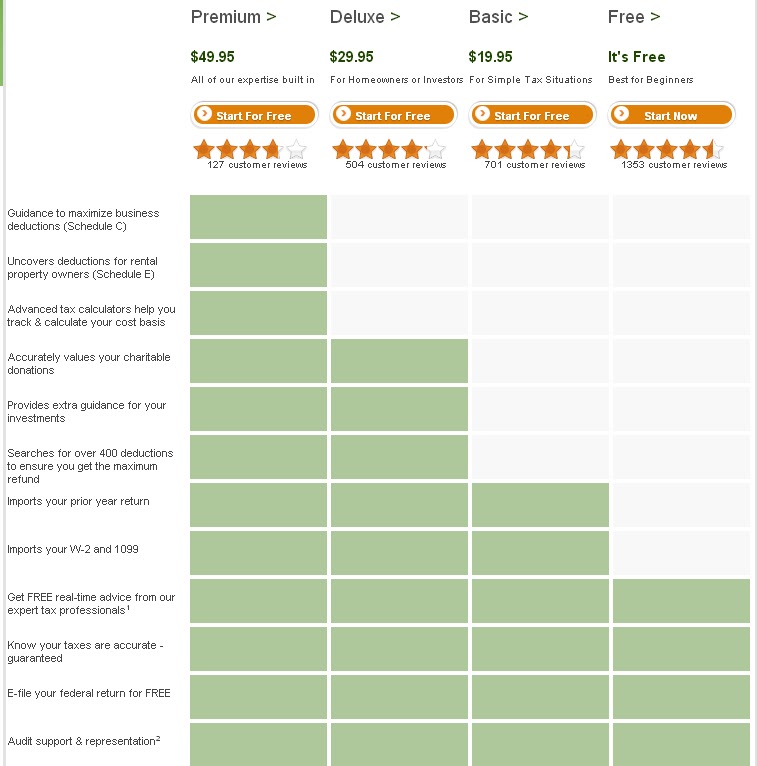
Now, I’m not sure what your reaction to this screen above is, but at first glance to a person that doesn’t spend a lot of time critically evaluating personal finance programs, it seems like if you choose the Free Edition, you potentially won’t get ANY DEDUCTIONS ON YOUR TAXES.
However, this simply is not the case. You can still get many deductions owed to you by using the free edition. So, my suggestion would be that people simply ignore this table and click the “get started using the Free edition button” if that was what you think is right for you at this point.
What is Free and What Must You Pay for Regarding Income?
Having dodged that landmine, you then proceed to set up your H&R Block account, enter your identifying personal information, and the next section you will come to is where you enter any income you had for the relevant tax year.
I was very pleasantly surprised with H&R Block’s version of the income section of their tax preparation platform. On the main page of the income section (shown below), they very clearly spell out in catchy red text what types of income entries require you to upgrade to a paid version of their platform and was does not.
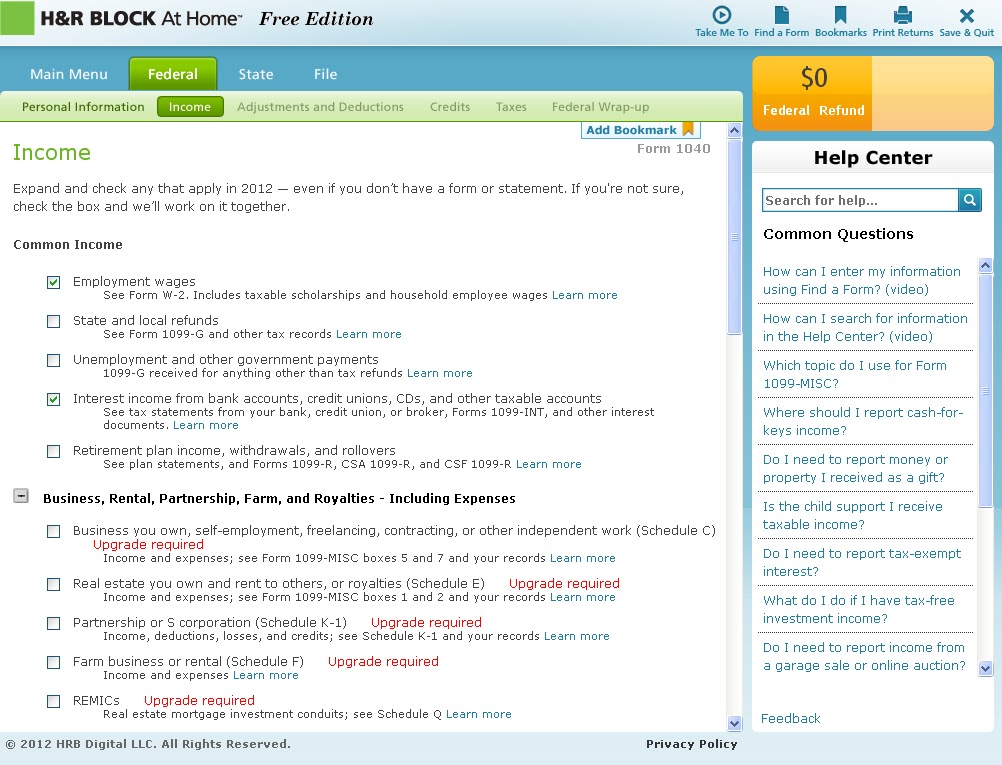
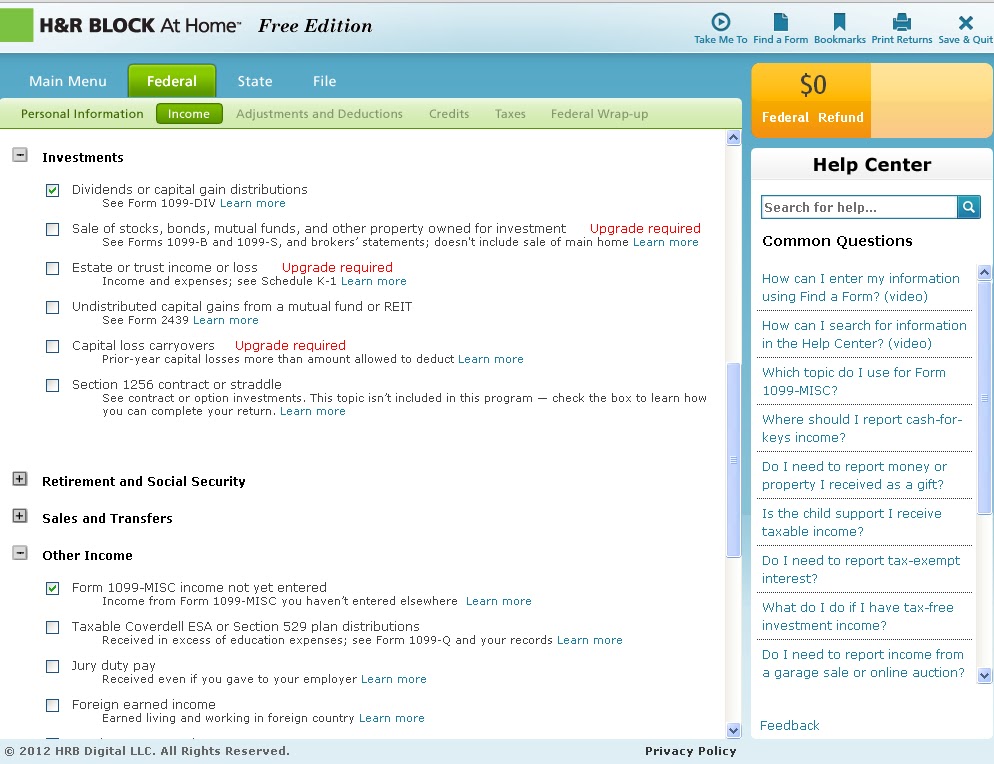
As can be seen in the screenshot above, below is a summary of what you must pay for and what is included in the Free Edition of H&R Block:
- Included in Free Edition
- Wages from regular employment (includes scholarship/fellowship income).
- 1099-INT and 1099-DIV.
- 1099-MISC income, provided that it is not regular/self employment income.
- If you have a 1099-B (sale of taxable securities), it does actually require you to upgrade to a paid version to continue with that section.
- If you have income from rental properties or self-employment, it does actually require you to upgrade to the $50 Premium version to continue with that section.
What is Free and What Must You Pay for Regarding Deductions?
In the deductions section of H&R Block, they also make it very clear to discern what is included in the Federal Free Edition and what you must pay for. In fact, it’s so simple because there ARE NO PAID UPGRADE REQUIREMENTS when it comes to deductions. Pretty sweet, right?!
That’s right, all of the deductions I inspected (shown on screenshots below) are actually included in the Federal Free Edition.
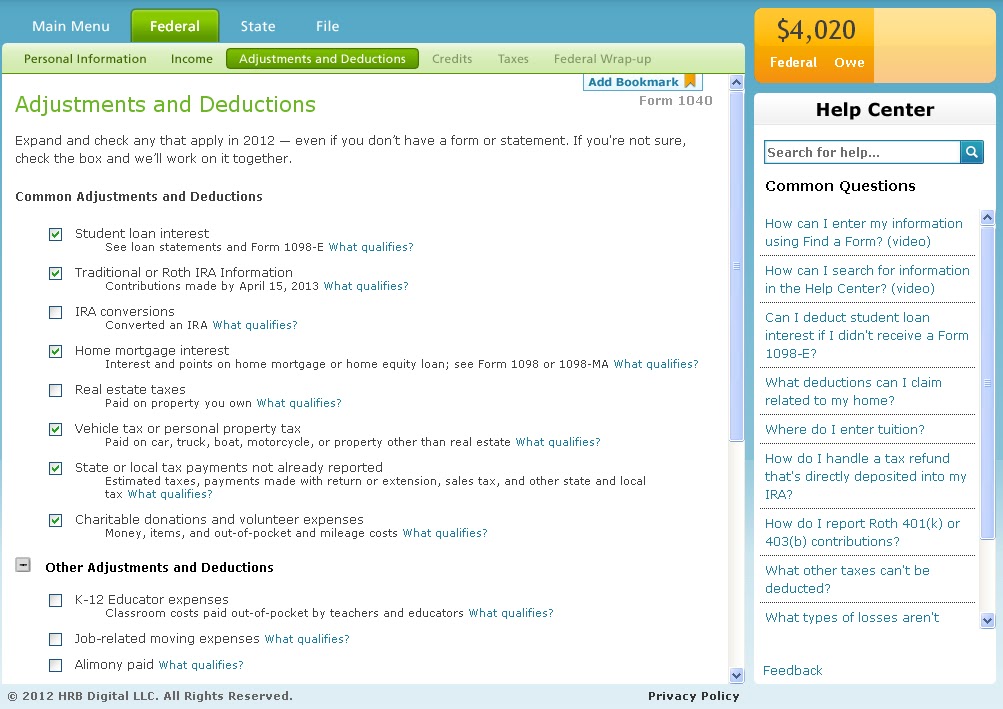

Just to drive this point home, all of the deductions listed below are in fact included in H&R Block’s Federal Free edition.
- Home loan interest paid.
- Kids.
- Car / property tax.
- Student loan interest paid.
- Medical/HSA contributions.
- Job-related moving expenses.
- Estimates taxes paid (as long as they are not for self employment income).
- Charity donations.
Conclusions
In my opinion, H&R Block offers a super-reliable, AMAZINGLY easy-to-use online tax preparation platform that is hard to go wrong with. Even if your tax situation dictates that you have to use one of their paid options, I would consider it money well spent, and likely, a significant tax savings over the use of live tax professional. I also like the fact that their platform does not try to “trick” you in to spending money that isn’t necessary with upgrades; they seem to legitimately want to help you get through your taxes effectively. They are also pretty inexpensive according to market prices for tax prep help.
I sincerely hope this post helps you to understand not only a little more about what features H&R Block offers, but to also help you determine what level of services/pricing you actually need to use in their platform to accommodate your personal tax situation.
In Part 3 of this series, we’ll take a look at Tax Act’s online tax preparation platform – on the way soon!
How about you all? How about you all? Have you ever used H&R Block’s online platform to do your taxes? If so, how did you like it? Did you ever find yourself paying for a upgrade to the online service when you really didn’t need it?
Share your experiences by commenting below!
A Detailed Look Inside TurboTax’s Online Tax Preparation Platform – What is Free and What Must You Pay For?

————————————————————————————————————————
Welcome to My Personal Finance Journey! If you are new here, please read the “About” or “First-Time Visitor” pages to find out more about us. If you would like to receive free updates on articles like this by email, then sign up here or you can subscribe to the RSS feed. Also, check us out on Twitter or Facebook. Thanks for visiting! Keep on learning!
————————————————————————————————————————
Tax season is in full flight here in the US. As I mentioned several days ago, if your taxes are very simple, please don’t pay someone $60 to help you fill out a 1040EZ federal tax return – fill it out yourself.
In my mind, an even better option for individuals without a business (if you own your own business, I honestly believe that you should have the help of CPA to make sure you don’t miss anything and to bounce ideas off of) over filling out the tax forms directly are to employ one of the many low-cost online tax preparation platforms available on the market. These platforms ask questions in normal language (read non-IRS talk), and then populate the numbers in to the tax forms for you. A pretty sweet deal in my book!
It’s pretty amazing to see how the online tax preparation business has grown over the past few years. In searching around the Internet, I found around 12 legitimate options currently available. Some of the newer/lesser known options are listed below:
- Free Tax USA
- eSmart Tax
- My Free Taxes
- eTax
- Free File (IRS)
- Tax Slayer
- eFile
- Express 1040
- Rapid Tax
However, without a doubt, the most widely-used online tax prep platforms are TurboTax, H&R Block, and Tax Act.
Because of the wide spread use of these three platforms, I think it’s important for people to have a good working knowledge about what they offer. However, in my experience helping people with their taxes, the primary thing that my friends get confused about is what these programs offer for free, and what is it you have to pay for. More specifically, I find that they often end up paying for one of the service upgrades being offered, when in fact, their taxes were actually simple enough that they could have just used the free versions.
So, the purpose of this post series is to dissect each of these 3 most popular programs one-by-one to determine what they offer, what is free, and what you need to pay for. Let’s get started, shall we?
TurboTax
TurboTax is perhaps the most well known, oldest, and most respected tax preparation software and online platform. In fact, I can remember walking in to office supply/computer stores when I was 8 years old and seeing TurboTax being sold in the CD-ROM version (maybe even floppy disk, too? haha). As such, it’s the platform we will analyze first:
Shown below is the overall pricing for the various options on offer by TurboTax. In my opinion, this table is a nice overview of the options and is pretty self explanatory/clear for normal folks like us. There are four things that I want to make sure to point out though:
- You don’t actually pay for anything until you officially click “file taxes.” This means you can go through the system and fill in your tax information without worrying about accidentally paying for anything until the very end of the process.
- The prices in red shown in the below screenshot are only the pricing for filing your federal tax return. What this means is that you will have to pay an extra fee on top of the ones shown in the chart below because you are required by law to file state taxes. Don’t be surprised by this!
- According to TurboTax’s State Tax filing pricing, it costs $28-$37 (price depends on current promos going on) per state to file your state taxes.
- What this means is that the state tax filing is perhaps where TurboTax makes most of its money…..?
- One of the nice little perks about the paid versions of TurboTax is that they will automatically save and import your previous year’s tax information to the current year. They will also auto-populate your employer details based on solely their EIN. Nice things to have, but maybe not necessarily worth paying for if you are pressed for money..
- Finally, it’s a little confusing in reading the chart below, but if you have a self-employment business/income (including farm business) to report, the only option available through TurboTax is the Home & Business (please note, this is not necessarily the same thing as merely having a 1099-MISC from some random side income you did – more on this will be discussed below in the Income section).
So, as I mentioned above, this chart is pretty straight-forward and easy to understand. However, the place where it gets confusing and people with simple taxes end up paying for un-needed service add-ons is DURING the process of filing out your tax information as you are going through the various steps in the system.
Because of this, I feel we need to spend some time discussing places where potential mistakes could occur causing, someone that started their tax filing using the Free Edition (far left above) to end up unnecessarily using the Deluxe (middle, “most popular”) version. This happens quite often, in my opinion, because at almost every step of the way, the questions prompt you to upgrade to one of the paid options.
First, right off the bat, after you create a new TurboTax account, you are taken to this screen:
Now, I’m not sure what your reaction to this screen above is, but to my girlfriend (who I recently helped with her taxes, which are very simple by the way), she read this screen as meaning that if she doesn’t use at least the basic version, she won’t get ANY DEDUCTIONS ON HER TAXES. Because of this, she has been unnecessarily paying for the Basic or Deluxe versions of the program for the past 4 or more years. I can definitely understand where she is coming from on this, as to someone that doesn’t spend a lot of time with critically evaluating personal finance programs, the Federal Free Edition seems like it offers nothing.
However, this simply is not the case. You can still get many deductions owed to you by using the free edition. So, my suggestion would be that people simply ignore this first table and click the continue button.
Five seconds later, after you enter your personal information (address, email, SSN, etc), you get hit with ANOTHER up sell screen, shown below. PLEASE, IGNORE THIS ONE AS WELL! The Federal Free Edition is still just fine!
OK, Whew! You made it past those first two wallet-zapping landmines.
What is Free and What Must You Pay for Regarding Income?
The next place that people with random side income (such as my girlfriend) can get caught up is when it comes time to enter the amounts of income received on Form 1099-MISC.
When you go to enter the amount displayed on your 1099-MISC, you will see the following screen below. The goal of this screen is to determine if the income was random/side income or if it can be considered more of the result of steady self-employed business operations. If it is from self-employed business operations, you are required to pay/upgrade to the $75 Home and Business version of TurboTax to continue. There is now way around it.
On the other hand, if it was not regular, recurring, and/or self-employed business income, merely having a random 1099-MISC does not disqualify you from being able to use the Federal Free Edition of TurboTax.
If you answer YES to any of the questions shown on the below screenshot, you will however, be required to upgrade to the paid Home and Business version because the income is considered self-employment income.
Regarding income from investments, such as stock/mutual fund sale proceeds, interest, rental property, and dividends, listed below is a summary of what you must pay for and what is included in the Federal Free Edition:
- 1099-INT and 1099-DIV are free/included in the Federal Free Edition.
- If you have a 1099-B (sale of taxable securities), it does actually require you to upgrade to the Premier version to continue with that section.
- If you have a income from rental property, it does actually require you to upgrade to the Premier version to continue with that section.
What is Free and What Must You Pay for Regarding Deductions?
In the deductions section of TurboTax, they also make it fairly confusing to discern what is included in the Federal Free Edition and what you must pay for.
To even further complicate matters, you have to be able to determine when a screen like the one below pops up, whether or not the upgrade to a paid version is a “recommendation” or if the upgrade is absolutely required in order to proceed with that section.
Can you imagine how confusing this screen above would be to someone who is uncomfortable dealing with their finances/taxes and is already stressed out about the situation? Which box do you think they would click? That’s right, UPGRADE CITY!
However, I am here to tell you that for all of the deductions I inspected (shown on screenshots below), they are all actually included in the Federal Free Edition.
Many of them, however, do have suggestion screens like the one above that pop up. But, all you have to do is click NO THANKS and then it will let you continue entering your deduction details. Kind of sneaky, eh? But, it is good business and unfortunately, just the way it is.
Just to drive this point home, all of the deductions listed below are in fact included in TurboTax’s Federal Free edition, but just might have little decoy upgrade recommendation screens that you must click, “No Thanks,” to.
- Home loan interest paid.
- Kids.
- Car / property tax.
- Student loan interest paid.
- Medical/HSA contributions.
- Estimates taxes paid (as long as they are not for self employment income).
- Charity donations.
Conclusions
In my opinion, TurboTax offers a super-reliable, very easy-to-use online tax preparation platform that is hard to go wrong with. Even if your tax situation dictates that you have to use one of their paid options, I would consider it money well spent, and likely, a significant tax savings over the use of live tax professional.
I sincerely hope this post helps you to understand not only a little more about what features TurboTax offers, but to also help you determine what level of services/pricing you actually need to use in their platform to accommodate your personal tax situation.
If you’re interested, step on over to Part 2 of this series where I take a look at H&R Block’s online tax preparation platform!
How about you all? Have you ever used TurboTax to do your taxes? If so, did you ever find yourself paying for a upgrade to the online service when you really didn’t need it?
Share your experiences by commenting below!
"What a Deal! Only a $59.99 Fee to File a 1040EZ!" Please No. Instead, Try a FREE Step-by-Step Guide to Filling Out Your 1040EZ

————————————————————————————————————————
Welcome to My Personal Finance Journey! If you are new here, please read the “About” or “First-Time Visitor” pages to find out more about us. If you would like to receive free updates on articles like this by email, then sign up here or you can subscribe to the RSS feed. Also, check us out on Twitter or Facebook. Thanks for visiting! Keep on learning!
————————————————————————————————————————
As we all know, tax season is in full flight here in the United States. Taxpayers are frantically digging through their records and collecting their W2’s/1099’s, and CPA’s and other tax preparation professionals are churning out 80 hour work weeks to meet the deadline.
How are you doing so far in getting your taxes filed?
Per usual, for me this year, the rate limiting step is getting my last two Forms 1099-DIV/1099-INT from Sogotrade.com and Zecco.com (now TradeKing). They always claim that they are working towards a February 15th deadline for getting everyone’s tax forms issued. However, without fail, they manage to get an extension until the first week of March to issue these forms. This, of course, is a pain for me because I then have to hustle a little more to mail out my tax forms to my accountant to then turn around/prepare.
All side-tangents aside (no pun intended), the real reason that I’m writing this post is that around tax time every year, I see advertisements stating how an accountant or tax prep company is offering some GREAT deal for a limited time only to have them help you prepare a 1040EZ for only $XX.99.
- At Walmart, the H&R Block booth near the checkout area is advertising “$39.99 to prepare your 1040EZ.”
- On the advertising place-mats at a local restaurant, I recently saw an accountant ad that stated “they’ll help you do your 1040EZ for only $59.99.”
Ok, so let’s stop right there. Did I miss something? The 1040EZ was a filing form built by our friends at the IRS to be EASY, right? Why would you need to pay to get help with it?
Well, I think that the whole reason why people think that taxes are difficult is that there is a certain stigma that has been built by our society over the years that taxes are evil, unfair, long-winded, technical, too hard to understand without a PhD in economics, and/or not something that is not worth your time.
Well, I’m here to provide a little moral support and tell you that this form is not some complicated animal that you need help/to pay for to fill out. You can fill it out just fine by yourself (or better yet, with the help of a free online tax preparation/filing software, something which will be covered elsewhere in more depth).
So, how does one get started filling out a 1040EZ? I’m glad you asked! Read on!
Step 1 – Meet/Print Off Your New Friend – Mr. 1040EZ
By clicking here, you can access the current tax year’s respective 1040EZ directly from the IRS’ website.
This is a one-page federal tax filing document that is built to be non-intimidating. Check out the picture below. The entire document fits within the confines of this blog post column. Nothing that small can be very scary, right?! 🙂
There are only 12 numbered boxes to fill out along with your writing your usual personal information in the grey boxes at the top.
In addition, you might also want to download and scan through the official IRS publication describing how to fill out the form 1040EZ. You can download the most recent one by clicking here. Unfortunately, due to the nature and regulations of taxes, they have to put many extraneous FYI-type paragraphs in to this publication, causing it to be a full 42 pages describing how to fill out one tiny 1 page form. And the IRS wonders why people thinks taxes are difficult to understand, eh?
Step 2 – Quick Check to Make Sure a 1040EZ is the Right Form for You – Taking the Standard Deduction
Before proceeding, you want to check just briefly that a 1040EZ is indeed the right type of federal tax form for you to be filling out.
Essentially, by opting for use of the 1040EZ (instead of the longer 1040), you are saying that you want to take “the standard deduction” instead of itemizing your deductions. In other words, it makes sense to use the form 1040EZ if the standard deduction ($5,950 for 2012) is greater than any itemized deductions you could list out (charity contributions, mortgage interest, etc). In addition, you are also basically saying that, “Hey, I have very simple finances – likely only 1 source of income and very few non-retirement investments (mostly consisting of interest bearing savings accounts).”
Having established that, you also should go through the really good checklist the IRS put together in their 1040EZ publication shown below to make sure you qualify for the use of the 1040EZ.
Also, listed below are “1040EZ deal-breakers” in the sense that if you RECEIVED one of the forms listed below, you do NOT qualify to file a 1040EZ and must file a Form 1040.
- 1099-MISC (this would disqualify me).
- 1099-DIV (this would also disqualify me).
Step 3 – Filling Out Your 1040EZ – Income Section – Boxes 1-6
So, by now, you’ve determined that filing a 1040EZ form is right for you and you’ve downloaded/printed out a copy to work off of. Now, it’s time to actually fill it out to determine how much of a refund you will receive or how much in unpaid taxes you still owe.
The first part of the 1040EZ form is the income section, and it contains 6 total boxes to fill out. Listed below are some important points I noticed while reading through the IRS’s 1040EZ instructions that you might want to pay special attention to:
- On Line/Box 1, as the name implies, this is where you enter the total amount of your wages that is shown on your W2(s).
- However, one thing that is slightly tricky here is that on Line 1, you must also include your total amounts of non W2 income as well, including wages earned as a household employee, tip income not reported to your employer, and untaxed fellowship/scholarship income (like I have in my role as a graduate student).
- Line/Box 2 for Taxable Interest is where you report the amounts displayed on any forms 1099-INT that you received.
- As mentioned above, 1099-DIV amounts are not suitable for a 1040EZ.
- Line/Box 5 – This is simply the place where you write in the total amount of deductions that you are going to take.
- Deductions are your friend – they reduce your taxable income.
- This includes the standard deduction ($5,950 per person for 2012) plus exemptions ($3,800 per person for 2012).
Step 4 – Calculate Your Total Taxes for the Year – Box/Line 10
Aside from signing and including your direct deposit banking information on the form 1040EZ, the only other step that you need to do that can be a little bit confusing is to calculate the amount of taxes you needed to pay for the year, often called your tax liability.
In order to to do this, you will need to locate where the value written in Line 6 (that you already filled out) falls in the series of Tax Tables shown on pages 31-39 of the IRS’ 1040EZ publication.
Shown below is an example excerpt from this table. All you need to do is find where your Line 6 Taxable Income falls in the ranges shown and then merely follow that number across to the next few columns to determine how much tax you are responsible for.
Once you complete this step, you can then proceed to calculate either the refund you will receive or the additional amount of taxes you owe.
Step 5 – Mail in Your Return
Having calculated how much you will receive as a tax refund or additional taxes that you still need to pay, now is the time to complete the final step and mail in the tax return.
In order to do this, you will need to click here to view the 2-page Form 1040-V. This is a form that contains instructions on how to file your federal tax return, where to send it, and what all to write on the check (if you owe more taxes).
On Page 2, you’ll see a table of addresses for where to send your tax return if you are sending a check and another set of addresses for if you are not sending a check for additional taxes. Simply follow the instructions, and stick your return in the mail. Make sure to make an extra copy for yourself for future records as well!
Conclusions
So, there you have it – 5 easy steps to help you fill out your own Form 1040EZ and file your federal tax return so you don’t have to fall in to the trap of paying someone $40-$60 to do it for you when you are out shopping at Wal-Mart or dining at restaurant and see an advertisement!
Aside from saving money, I feel that it’s also a good learning experience to have some working knowledge of how taxes work. And, using an easy form like the 1040EZ can be a good way to get this process started.
Of course, as I eluded to above, there are (in my opinion) easier free ways to fill out and file your 1040EZ using free online tax preparation programs instead of you having to manually input the numbers yourself. Applications such as TurboTax and H&R Block Online ask questions in an organized fashion that help assemble your return for you. Just watch out because while they don’t make any money off of you for a simple federal tax filing, there are a lot of extra features that they quickly charge you for, and can add up!
How about you all? Have you seen any “awesome” deals where people are charging to fill out your 1040EZ for you? Do you fill out your taxes yourself or employ the help of an accountant?
If you file yourself, do you fill out the tax forms directly, or use a computer program like the ones listed above?
Share your experiences by commenting below!